Add Body or Geometrical Set
Quickly add a Body, Geometrical Set, or Ordered Geometrical Set to the current Part with user-defined naming, coloring, and hierarchy.
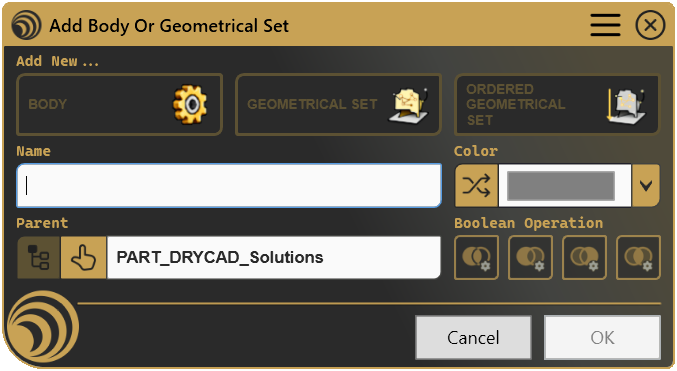
Every time you add a Body or Geometrical Set, you get a generic name, no color, and another round of manual cleanup, click after click, part after part. Add Body or Geometrical Set handles naming conventions, graphical properties, parent assignment, and Boolean operations from a single panel, consistently, every time, with zero post-creation fixing.
What it does
- Creates Bodies, Geometrical Sets, and Ordered Geometrical Sets, all three types from one unified interface, no menu diving required.
- Enforces naming conventions, pre-fills names from your configuration, applies case conversion (upper, lower, proper) at creation, and auto-increments when a name already exists.
- Applies color and line width automatically, fixed colors, random colors, or none, per feature type, based on your team’s settings.
- Handles parent assignment, target the top-level Part or any Body / Geometrical Set you select directly from the tree structure.
- Sets Boolean operations, Add, Assemble, Remove, or Intersect when inserting a Body inside another Body, with a configurable default so the right operation is always ready.
How it works
Launch from the DRYCAD Suite CommandBar, pick your feature type, confirm the name, choose a parent if needed, and click OK. The tool creates the feature, applies graphical properties, sets it as the active In Work Object, and closes. The whole thing takes seconds, and it looks exactly the same every time, whether it’s your first part or your hundredth.
Screenshots
Where it fits
Included in the Starter plan and available across every tier. Any mechanical designer benefits from consistent naming and automatic graphical properties from the first feature they add, whether they work alone or as part of a larger team.
Full documentation
Get Started
Design better, every day.
Reduce errors, automate repetitive tasks, and free up time to innovate. Contact us for a pilot test on your real project.