Create New File
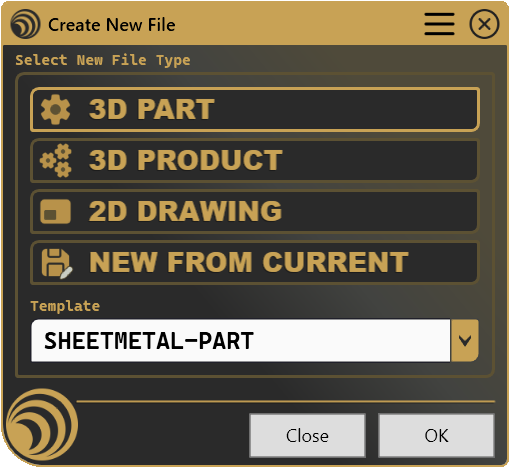
Create new Part, Product, and Drawing documents from your company's own templates with a single click, or duplicate the file you already have open.
File “New” option gives you a blank canvas and nothing else, every Part, Product, and Drawing starts from zero, standards reapplied by hand, every single time. Create New File skips that: pick a document type, pick your company’s template if one’s configured, and the new file opens already built the way your team agreed it should be.
What it does
- Creates from your templates, Part, Product, and Drawing documents are generated straight from predefined template files, picked by type with one click.
- Duplicates what’s already open, “New From Current” starts a new document from the active one, no manual Save As detour.
- Falls back gracefully, no template configured for a type? It just creates a clean default document instead, no errors, no fuss.
- Names things automatically, new 3D documents and drawings get a unique name on the spot, so nothing lands in your project untitled.
- Saves itself, if you want, new documents can be routed straight to a configured folder the instant they’re created.
How it works
Pick a file type from the panel, choose a template if more than one is configured for that type, and hit OK. Your CAD opens the new document already built from the right starting point, no separate “apply standard” step required.
Screenshots
Where it fits
Included in the Professional tier. It’s less a feature and more a starting condition, the difference between opening a project already aligned with how your team works, and opening a blank page and rebuilding that alignment by hand, every time.
Full documentation
Get Started
Design better, every day.
Reduce errors, automate repetitive tasks, and free up time to innovate. Contact us for a pilot test on your real project.